Building PeteGPT — What the Ultimate Sales Coach Taught Me About Prompt Engineering
PeteGPT started as a deliberately silly way to practise prompt engineering, but it quickly became a much broader Python learning project. Building it taught me how to work with the OpenAI API, manage Python environments and API keys, structure code with functions, store conversation state with lists and dictionaries, add variation with randomisation, and turn a terminal script into a simple browser-based app using Panel. The most interesting lesson, though, was that prompt engineering is not just about writing longer or more detailed instructions: it is about shaping behaviour, handling edge cases, using examples, managing context and deciding when ordinary programming logic should take control. PeteGPT may be ridiculous, but building it helped me understand how Python, prompts, interfaces and AI models come together to form the beginnings of a real AI application.
From theory to practical:
There is a point in learning anything technical where reading about it stops being useful, and you need to build something. Not something commercially viable. Not something that needs a pitch deck, a roadmap, or a business case. Just something small enough to finish, but interesting enough that you actually care whether it works.
PeteGPT was that project for me.
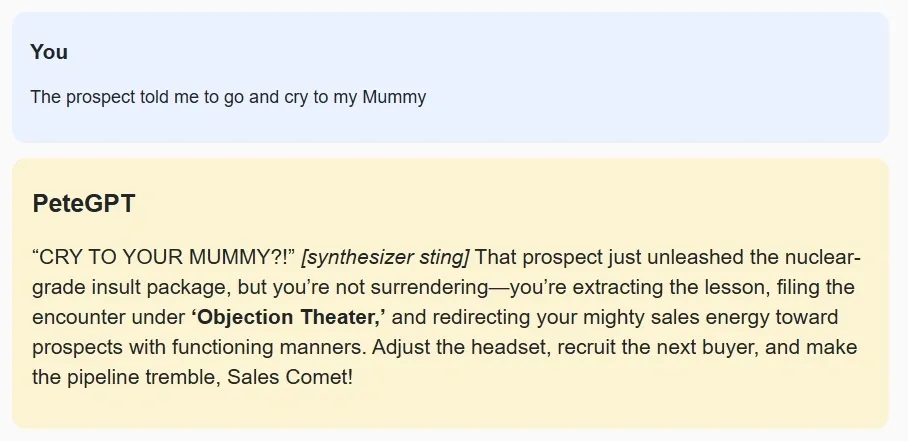
The idea was deliberately stupid. Build an AI sales coach that refuses to accept defeat. Tell it that a deal is dead, and it argues with you. Tell it that the prospect hates your product, and it somehow finds a positive angle. Tell it you want to give up and PeteGPT reacts like an over-caffeinated sales trainer from the 1980s who has just discovered motivational posters.
It started as a prompt-engineering exercise. It ended up teaching me considerably more about Python, APIs, user interfaces, and the strange gap between telling an AI what you want and actually getting it to behave that way.
From calling an API to building something:
At the beginning, the Python was very simple. Load the OpenAI library, send a prompt, print the response. That alone was useful because it moved AI from something I interacted with through ChatGPT to something I could programmatically interact with.
The first lesson, however, had almost nothing to do with AI. It was Python environments.
I successfully installed the OpenAI package, but VS Code kept telling me the module did not exist. Eventually, I discovered that the Python interpreter used by the terminal was not the same one used when I pressed the Run button in VS Code. One was pointing to my Anaconda installation; the other to a separate Python installation. The code was fine; Python could not see the same packages.
That is the sort of problem that sounds trivial once you understand it, but is incredibly confusing while you are learning. It also taught me something fundamental: when Python behaves inconsistently, check which interpreter is actually executing the code.
Once that was sorted, I started working with environment variables. Rather than putting an API key directly into the script, I created a .env file and loaded it using python-dotenv. That introduced another useful idea: application code and secrets should be kept separate. It is a small thing, but it starts to make the project feel like software rather than a collection of copied code snippets.
I also got more comfortable with functions. I created helper functions, such as get_completion_from_messages(), to separate the code responsible for talking to the model from the code responsible for the user interface. That may sound basic, but it changes how you think about programs. Instead of writing instructions from top to bottom, you start thinking in components, each with a job.
Along the way, I used Python dictionaries and lists to store the conversation history, f-strings to insert text into prompts, random.choice() to vary PeteGPT’s behavior, and pathlib to work with local files. None of these concepts was particularly advanced on its own, but combining them into something that actually worked made them far more memorable than learning them in isolation.
From the terminal to the Python interface:
Initially PeteGPT just printed its answers into the terminal. That proved the idea worked, but it was not much fun to use. I wanted something that felt more like a little application, so I used the Panel Python library to build a browser-based interface. The app now has an input box, a button, a scrolling conversation window, and a suitably awesome photograph of me wearing a “NEVER GIVE UP” hat and giving two thumbs up.
That part of the project forced me to think differently again. A terminal script normally runs from top to bottom and finishes. A user interface sits there waiting for something to happen. Pressing the button triggers a function; that function reads the text box, sends the message to the AI, adds the response to the conversation, and updates the screen.
That introduced me to event-driven programming without me really setting out to learn it. The conversation itself is stored as a list of dictionaries:
context.append({
“role”: “user”,
“content”: prompt
})
When PeteGPT replies, another message is added:
context.append({
“role”: “assistant”,
“content”: response
})
The entire conversation can then be sent back to the model on the next turn, allowing PeteGPT to remember what has already been said. Suddenly concepts like state and context became very tangible. The model itself does not magically remember the previous conversation. My Python code is responsible for storing it and sending it back.
From writing a prompt to prompt engineering:
The most interesting part of the project was the prompt engineering. My first instinct was to tell the model what PeteGPT was supposed to be: You are an enthusiastic sales motivator. Never let the salesperson give up. It worked, but only partially.
The model would sometimes become sensible. It would start giving balanced sales advice. It would acknowledge that a deal might genuinely be lost. Occasionally it sounded more like a corporate training manual than a ridiculous motivational lunatic. So I made the prompt stronger.
I added rules. I told it what phrases it should never use. I told it what behavior should happen when someone said: “I give up”. I specified a maximum answer length. I defined the tone as parody rather than sensible coaching That improved things, but created another problem: repetition.
PeteGPT discovered a handful of phrases it liked and started using them constantly. “YO!”, “PUT YOUR FOOT ON THE GAS!” and “LET’S GET IT DONE!” appeared again and again.
That was when the prompt-engineering exercise became much more interesting. The issue was not simply making the model obey. It was balancing consistency with variety. I wanted PeteGPT to have a recognisable personality without producing the same response every time. So I added explicit variation rules. Do not use the same opening twice. Do not always use the same catchphrase. Use different metaphors. Occasionally behave like a football manager, sometimes an old-school sales trainer, sometimes an action-film character.
Then I moved some of that variation out of the prompt entirely and into Python. Each time the user submits a message, Python randomly chooses a comedy mode:
comedy_modes = [
“Act like an outraged football manager giving a half-time speech.”,
“Act like an absurd 1980s sales seminar speaker.”,
“Use a ridiculous action-movie metaphor.”,
“Act like an overexcited sports commentator.”
]
That instruction is then temporarily added to the conversation for that particular response. This turned out to be one of the biggest lessons from the project. Prompt engineering does not have to mean creating one enormous perfect prompt. You can combine prompts with normal programming logic. Python can decide which instruction to add, what context to include, how much history to send, and how the model should behave on a particular turn.
Once you see that, AI starts to look less like a chatbot and more like another programmable component.
From instructions to examples:
Another discovery was how useful examples are. Telling PeteGPT to “be funny” produced unpredictable results. Sometimes it was funny. Sometimes it simply sounded enthusiastic. Giving it examples of the kind of response I wanted made a noticeable difference. For example:
“The deal is dead? Incredible diagnosis, Doctor Sales — did you at least check for a pulse?”
That communicates far more about the intended voice than ten abstract instructions about humour. It effectively shows the model the target rather than describing it. This is one of the ideas I want to explore further. In prompt engineering, examples are not decoration. They can act like lightweight behavioral training inside the prompt itself.
From idea to creation – what PeteGPT taught me:
PeteGPT is obviously not a serious product. That is partly why it was such a useful project. Because I was not worrying about whether anyone would buy it, I could concentrate on understanding how the pieces worked. I learned how Python selects interpreters and packages. I used environment variables and API keys properly. I wrote functions, worked with lists and dictionaries, used f-strings and randomisation, handled conversation state, built a simple web interface and learned to read Python tracebacks without immediately assuming the entire project was broken.
On the AI side, I learned that prompt engineering is not merely writing increasingly detailed English instructions. It involves defining behavior, handling edge cases, supplying examples, managing context, designing for variety,, and deciding when normal code should control behavior rather than leaving everything to the model. Most importantly, I started to understand the relationship between software and AI. The model is only one part of the system.
Python controls the application—the prompt controls behavior. The conversation history provides context. The interface determines how a person interacts with it. The model generates the response. Put those things together, and you have something much more interesting than a prompt in a chat window.
You have the beginnings of an AI application. And apparently, in this case, one wearing a NEVER GIVE UP hat.
Lab status: ridiculous, functional, and surprisingly educational.